FireFlink FinderAndroid & iOS
Mobile Locator Finder – Capture Mobile UI Locators with Precision
FireFlink Finder empowers teams to capture optimal mobile UI element locators in a single click, saving up to 70% of automation testing time. Whether on emulators or real devices, FireFlink ensures effortless locator identification without reliance on third-party tools.
- Captures Locators on Emulators and Simulators: Identify and extract the most suitable locators from Android or iOS testing environments.
- Multiple Locator Strategy Support: Captures various locator types, allowing teams to select the most stable one.
- Dynamic UI Element Handling: Adapts to changing UI elements during execution for reliable test results.
Compatible With A Wide Variety Of Operating Systems
FireFlink Finder makes it simple and fast to find UI elements across both Android and iOS.
Supports Virtual Devices
Capture mobile UI elements on virtual devices quickly and easily.
Emulators
It also works efficiently with emulators, saving time and effort in mobile testing.
Simulators
FireFlink Finder captures UI elements seamlessly on simulators, reducing the need for real device setups.


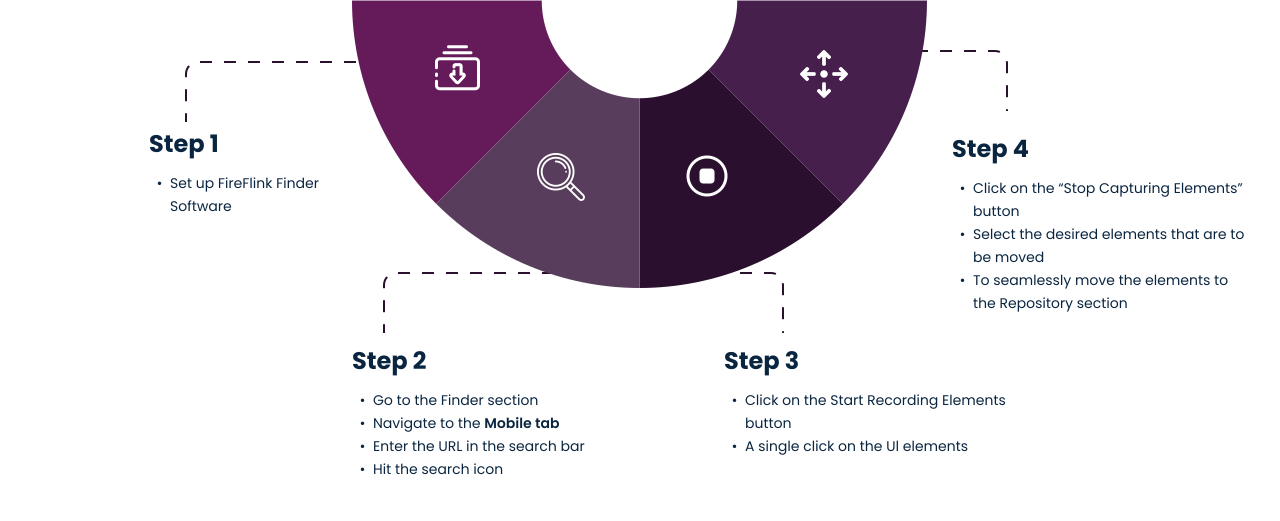
How FireFlink Finder Works for Mobile Applications
Follow the simple steps to carry out the locator identification process from FireFlink Finder for your mobile applications
Unique Features of FireFlink Mobile Locator Finder
Easy to Use, No Sign-In Required
Start capturing mobile UI locators instantly—no account setup needed. When signed in, FireFlink seamlessly syncs with your workspace for a unified automation experience.
Emulator and Simulator Ready
Capture accurate UI locators directly from Android and iOS emulators or simulators. FireFlink ensures compatibility across virtual testing environments.
Smart Session Control
Pause and resume recording sessions effortlessly. FireFlink’s intuitive interface helps you manage locator capture without losing context or progress.
Auto-set Desired Capabilities
Launch apps faster with automatically configured desired capabilities. Skip the manual setup and focus on testing.
Multiple Locator Strategies
FireFlink captures several optimized locator options for each element, giving you the flexibility to choose the most stable and reusable one for your automation scripts.
Dynamic Element Support
Identify and capture dynamic UI elements with ease. Just select a base and reference element—FireFlink intelligently detects the dynamic locator for you.


Start your journey towards AI-powered, scriptless test automation now!
Join thousands of businesses leveraging our AI-based test automation platform and elevate your testing game!